PNG to JPG: Your Quick & Free Conversion Guide
As a creator, you’re constantly juggling different file types. One minute you’re designing a logo, the next you’re uploading photos to a website or attaching images to an email. Each platform seems to have its own rules and preferences, and getting your image formats right is a common, often frustrating, hurdle.
Two of the most popular image formats you’ll encounter online are PNG and JPG. Understanding the difference between a PNG and a JPG file is key to optimizing your workflow. Converting from PNG to JPG (or PNG to JPEG, which is the same thing) is a frequent necessity for improving website performance, ensuring compatibility, and managing file sizes effectively.
This guide will walk you through everything you need to know. We’ll explore the key differences between PNG and JPG, explain why you might need to convert from PNG to JPG, and show you how to do it in seconds. By the end, you’ll have a simple, free online tool to handle all your image conversion needs quickly and efficiently.
What’s the Difference Between PNG and JPG?
At a glance, PNG and JPG files can look identical. However, they are built differently, which makes each one better suited for specific tasks.
PNG (Portable Network Graphics)
PNG is a lossless compression format. This means that when you save an image as a PNG, it retains all of its original data and quality. No detail is lost, no matter how many times you save it.
The standout feature of the PNG format is its support for transparent backgrounds. This makes it the ideal choice for logos, icons, and any graphic that needs to be placed over other images or colored backgrounds without a clunky white box around it. The trade-off for this high quality and transparency support is that PNG files are often much larger than other formats.
JPG/JPEG (Joint Photographic Experts Group)
In contrast, JPG (often seen as JPEG) is a lossy compression format. When an image is saved as a JPG, its file size is significantly reduced by permanently removing some of its data. While this results in a slight decrease in image quality, the difference is often unnoticeable to the human eye.
This smaller file size makes JPGs perfect for photographs and complex images on the web. Smaller images load faster, which improves website speed, user experience, and even SEO rankings. A key limitation, however, is that JPGs do not support transparency; any transparent areas will be filled with a solid color, usually white.
Here’s a simple table to summarize the differences:
Feature | PNG | JPG (JPEG) |
|---|---|---|
Compression | Lossless | Lossy |
Transparency | Yes | No |
Best For | Logos, graphics, icons | Photographs, web images |
File Size | Larger | Smaller |
Why Would You Need to Convert a PNG to JPG?
Now that you know the differences, you can see why you might need to change a PNG to JPG. The main reasons revolve around size, compatibility, and usability.
Reduce File Size
The primary reason to convert a PNG file to JPG format is to make the image smaller. Large image files can drastically slow down your website’s loading speed, leading to a poor user experience and lower search engine rankings. A quick conversion can shrink a file to a fraction of its original size, making your web pages faster and more responsive.
Improve Compatibility
While PNG is widely supported, some older devices, software, or online platforms may have issues with it. You might also encounter upload size limits on certain websites or applications that your high-quality PNG exceeds. In these cases, converting the image to a more universally accepted and compact JPG is a simple fix.
Emailing Images
Have you ever tried to email a folder full of high-resolution PNGs? It can be a slow and frustrating process, both for you and the recipient. Converting those images to JPGs first makes them much easier and faster to send and download, saving everyone time and valuable inbox space.
How to Convert a PNG to JPG for Free
You don’t need to download any clunky software or pay for expensive programs to convert your images. The easiest and fastest method is to use a free online converter.
For a reliable, secure, and user-friendly experience, we recommend the PNG to JPG converter on Vinlyee.com. It’s designed to be fast, free, and completely private, getting your conversion done in just a few clicks.
Step-by-Step Guide
- Go to the Vinlyee.com image tools page and select the PNG to JPG converter.
- Upload your PNG file by dragging and dropping it or clicking the upload button.
- The tool automatically converts the file in seconds.
- Download your new JPG image to your device.
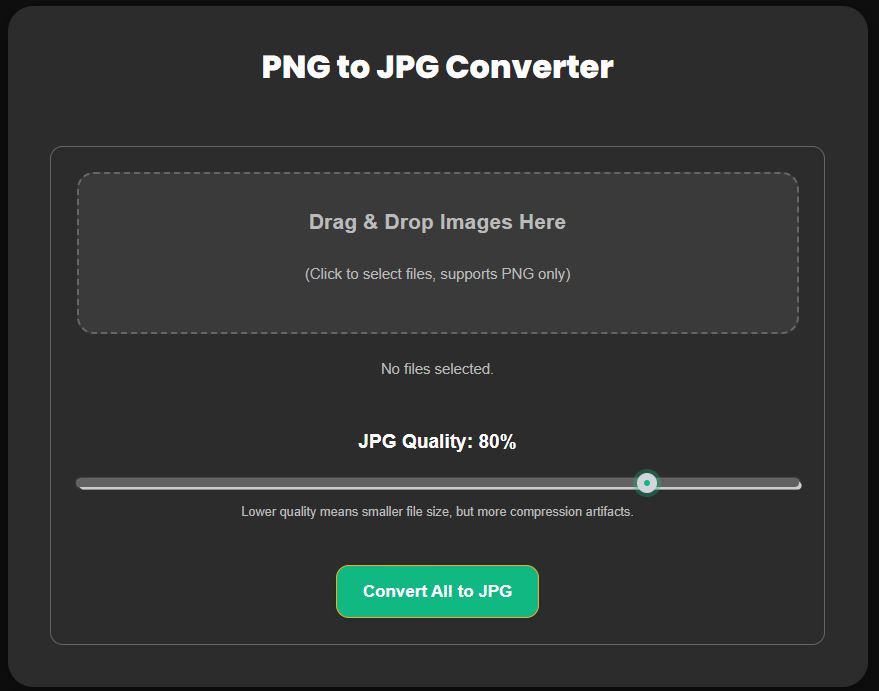
That’s it! The benefits of using Vinlyee’s tool are clear: there’s no sign-up required, you can perform unlimited conversions, and your files are processed securely without being stored on their servers.
What About Converting JPG to PNG?
Sometimes you might need to do the reverse and convert a JPG to a PNG. Why? A common reason is to prepare an image for editing. For example, if you want to remove the background from a photograph to create a transparent cutout, you’ll need to convert the JPG to PNG first. Converting to PNG also stops any further quality loss if you plan on re-saving the image multiple times during the editing process.
For these situations, Vinlyee.com also provides a free JPEG to PNG converter, giving you a complete solution for all your image format needs.
Simplify Your Workflow Today
Understanding the strengths of PNG and JPG formats is the first step toward a more efficient creative process. PNGs are perfect for graphics that need high quality and transparency, while JPGs are the go-to for photographs and optimizing web performance.
Converting from PNG to JPG is a necessary task for keeping your website fast, ensuring your images are compatible everywhere, and making files easy to share. Stop struggling with cumbersome files and incompatible formats. A reliable online tool is all you need to streamline your work.
Ready to make your life easier? Try Vinlyee’s free PNG to JPG converter today and make your creative process smoother!