Converting between image and document formats is a common task today. Sometimes you need to send a picture inside a PDF, and other times you want to extract images from a PDF. Our site offers two free online tools – one for PNG→PDF and one for PDF→PNG. These tools make it simple to switch formats without installing software or registering for an account.
If you’re looking for a simple converter PNG em PDF, you can use our friendly online tool and get results in seconds. Below, we explain what PNG and PDF are, why you might convert between them, and how to use our converters step by step.
What is PNG ?
PNG is short for Portable Network Graphics. It’s a high-quality image file type that lets you compress files without losing any detail. PNG files have some important features, such as
Transparent backgrounds are useful when you have logos , web graphics and design elements where you do need a background so it can be fitted on to anything. Here comes the png format.
PNg format is used in every web browsers and image editors , its the from one of the top and popular formats for images. And it is also popular for clear and high-quality without losing any detail.
What is PDF Format or why we use pdf format ?
PDF is short for “Portable Document Format.” Adobe made it in 1992. It’s a universal document format that keeps text, images, and formatting in a consistent layout. Some important things about PDFs are:
Preserved layout: PDFs look the same no matter what device or software you use.
Versatility: You can add text , graphics , urls and images in one file .
People often change images (like PNGs) to PDFs so they can share or store them more easily. When they need to edit or get individual pictures out of a PDF, they change it back to an image format (like PNG).
Why would you want to use a PNG to PDF converter?
There are many reasons to convert png to pdf or pdf to png for example :
Sharing is easier: PDFs work on all devices and platforms, so you don’t have to worry about whether the images will work on yours.
Better Printing Compatibility: Most printers and publishing workflows work best with PDF files, which means prints will be sharp and properly formatted.
Combine Multiple Images: Change and combine several PNGs into one PDF with multiple pages. This will make the file smaller and easier to email or store.
Extra Security: PDFs can be password-protected and encrypted, which gives them an extra level of security that PNG files don’t have.
In short, changing PNG files to PDF files is a great way to share, print, or keep images in a neat, safe way.
The best online tool for changing PNG files to PDF files
If you need to quickly and easily convert a PNG file to a PDF file, check out the Vinlyee PNG to PDF Converter on our site. This is why it’s the best choice:
- No need to make an account or add a watermark; it’s free.
- Fast and High-Quality: Conversions happen right away, and the image quality stays the same.
- You don`t have to install anything; everything works in your browser.
- It works on every device ( desktop, tablets and smartphones )
- And its safe because all the data remains in the browser you can also use these tool in offline mode you can check by once loading the page, you can disconnect the internet and it still works.
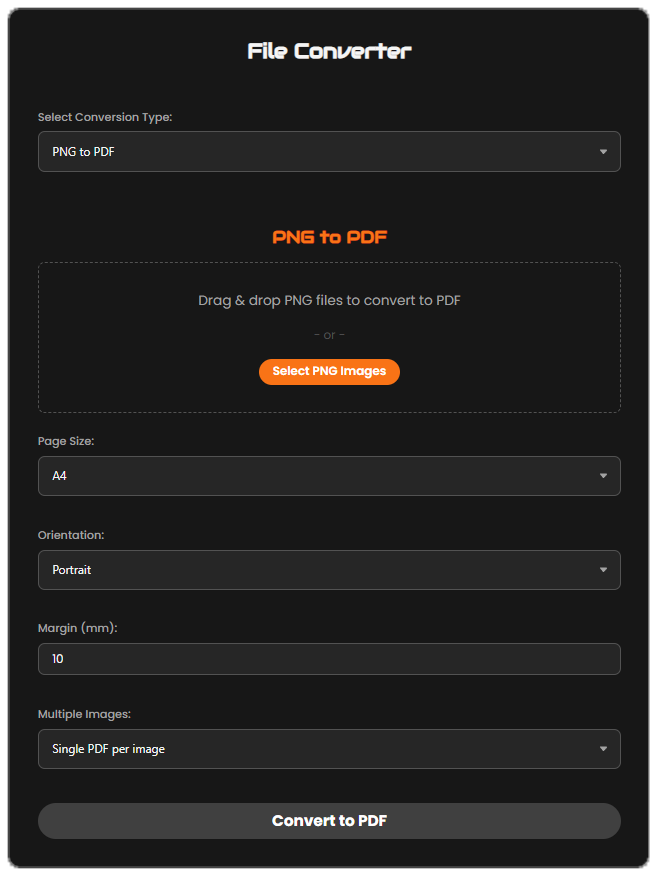
- All you have to do is upload your PNG, click “convert,” and download your high-quality PDF. No problems, no fees, and no software needed.
How to Change a PNG File to a PDF File (Step-by-Step Guide)
It’s very easy to use our PNG to PDF converter. Here’s how:
Visit the PNG→PDF page: In your browser, open the Vinlyee PNG to PDF Converter.
Put your PNG file here: To upload your .png file, click “Select file” or drag and drop it into the upload area.
Begin the change: Press the “Convert” button. The tool works on your file in a matter of seconds.
Get the PDF: When you’re done, click “Download” to save the PDF.
That’s all! Go to the site, upload your file, click “Convert,” and then download your PDF. It works on any device or browser.
Need the Opposite? Convert PDF to PNG
Sometimes you’ll need to extract images from a PDF. That’s when you should use our Vinlyee PDF to PNG Converter. This tool is perfect for:
- Editing slides or graphics: Extract charts or images for presentations or design projects.
- Creating thumbnails: Save PDF pages as PNGs for sharp, clear previews.
- Editing individual pages: Convert PDF pages to PNG for easy editing in any image editor.