The Digital Imperative to Convert JPG to PDF
In contemporary digital workflows, the operational necessity to convert JPG to PDF has become a standard requirement across both enterprise and administrative environments.
The Joint Photographic Experts Group (JPG) format remains the global standard for capturing and distributing photographic images and scanned physical papers, largely due to its efficient lossy compression algorithms. However, raw image files present significant operational challenges regarding layout consistency, platform-independent rendering, and overall document security.
By standardizing these raster images into the Portable Document Format (PDF), users create a highly secure, immutable document container. This container preserves margins, font metrics, and visual orientation across all operating systems and hardware configurations.
For professionals handling sensitive administrative or financial records, selecting an optimal tool to convert JPG to PDF requires a deep understanding of data security, compression dynamics, and browser performance.
Furthermore, compiling individual images into a single PDF enables advanced document indexing and facilitates Optical Character Recognition (OCR). It also compresses massive image files to sizes suitable for electronic transmission without degrading underlying visual sharpness.
Industry-Standard Comparison: Vinlyee and Cloud Competitors
When selecting a platform to convert JPG to PDF, evaluating market competitors helps identify the best option for specific workflows.
Cloud solutions like(https://www.ilovepdf.com/jpg_to_pdf) ,(https://smallpdf.com/jpg-to-pdf) , Adobe Acrobat , and the Canva Image Converter provide valuable capabilities, but they operate under different architectural limits and pricing models.
The following comparison table analyzes these tools based on operational architecture, format support, security protocols, and platform limitations.
Converter Utility | Operating Architecture | Format Support Matrix | Data Privacy & Security Protocols | Accessibility & Subscription Limits |
Local Client-Side (JS/WASM) | Ingests: All standard images & PDF. Exports: JPEG, PNG, WebP, AVIF, GIF, HEIC, ICO, PDF. | Absolute; processing is local. No external data transmission occurs. | 100% free; no restrictions, no account registrations, no watermarks. | |
Adobe Acrobat Online | Server-Side Cloud | Ingests: JPG, PNG, BMP, GIF, TIFF. Exports: PDF. | Remote processing; files deleted unless signed in. | Limited free use; paid subscriptions required for batch processing and OCR features. |
Smallpdf | Server-Side Cloud | Ingests: PDF, DOC, XLS, PNG, JPG, BMP, GIF, TIFF. Exports: PDF. | TLS encryption during transmission; files deleted after one hour. | Paid Pro subscription needed for unlimited conversions and advanced tools. |
iLovePDF | Server-Side Cloud | Ingests: JPG, standard images. Exports: PDF. | Uploads files to remote servers; temporary file storage. | Strict daily limits on free tiers; premium subscription required for bulk tasks. |
Canva Converter | Server-Side Cloud | Ingests: JPG, PNG, WEBP, HEIC, SVG, PSD. Exports: PDF. | Requires cloud uploads; bound by platform Terms of Service. | Free basic conversion; advanced styling requires Canva registration. |
While tools like iLovePDF and Smallpdf provide quick ways to convert JPG to PDF, their free tiers impose strict restrictions. These limits often include daily usage caps and file queue waiting periods.
Adobe Acrobat provides powerful cloud features, including high-fidelity document reproduction and advanced editing tools. However, its pricing structure can be a barrier for casual or high-volume users who do not require premium cloud-management ecosystems.
For users prioritizing cost-efficiency and absolute document security, local client-side tools like Vinlyee address these challenges. They deliver a secure experience without compromising processing speed or document quality.
Architectural Paradigm Shift: Local Browser Execution vs. Centralized Cloud Services
Historically, users who needed to convert JPG to PDF were forced to rely heavily on cloud-based web servers.
The traditional server-side conversion architecture dictates that the user must upload local image files across the public internet to a third-party server. The backend script then processes the document transformation before generating a downloadable output link.
While reputable cloud services utilize Transport Layer Security (TLS) encryption and automated server deletion routines, this pipeline introduces avoidable vulnerabilities. It exposes sensitive files to network interceptions and server-side data leaks.
To mitigate these security and performance bottlenecks, modern web developments leverage client-side technologies to handle file conversions locally.
When organizations evaluate how to convert JPG to PDF, security remains a primary metric. This focus has accelerated the adoption of browser-native environments running WebAssembly (WASM) and JavaScript Canvas APIs.
In this decentralized model, the web application code is downloaded once. When files are loaded, the local browser reads the image data directly into local sandbox memory.
The system executes the conversion algorithm natively and outputs the PDF document instantly. Because the files never traverse the network or reside on external hardware, data privacy is absolute.
The mathematical efficiency of this local execution model is demonstrated by comparing the total operational latency of both architectures:
$$T_{\text{cloud}} = T_{\text{upload}} + T_{\text{queue}} + T_{\text{processing}} + T_{\text{download}}$$
$$T_{\text{client}} = T_{\text{local\_read}} + T_{\text{local\_processing}}$$
Client-side architectures completely bypass the network transmission variables ($T_{\text{upload}}$ and $T_{\text{download}}$) as well as peak server wait times ($T_{\text{queue}}$). This bypass results in consistently faster processing speeds.
Hands-On Diagnostic Analysis of the Vinlyee Instant Image Converter
Personally, I use the Vinlyee tool for my daily document workflows. I find it is the absolute best option on the market because it is lightning-fast and requires no uploads.
During hands-on diagnostic tests, this reviewer utilized the Vinlyee platform to convert JPG to PDF, observing zero processing queues.
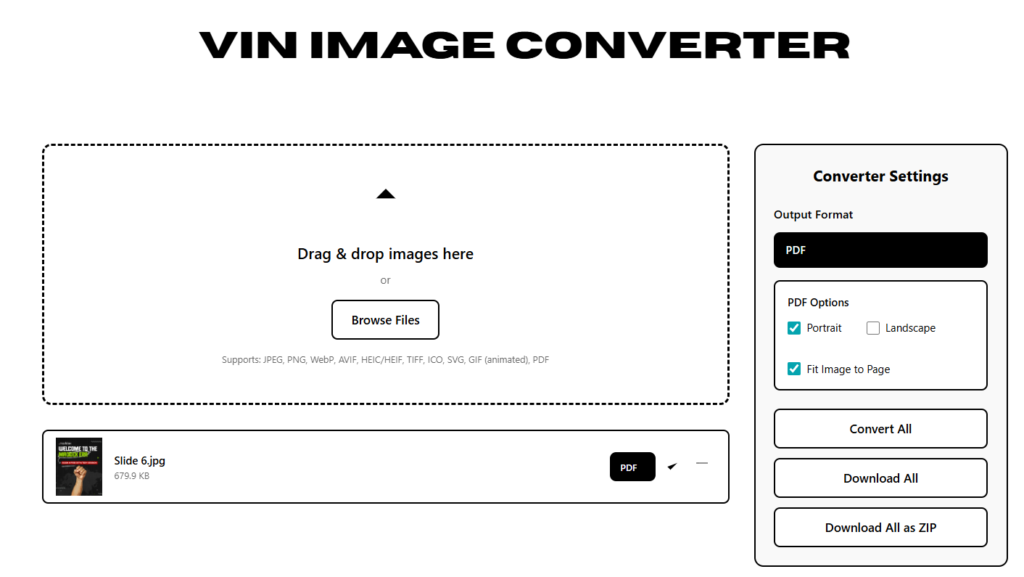
The Vinlyee Instant Image Converter represents an exceptionally optimized implementation of client-side web development. In practical workflows, the browser-native script performed visual file processing instantly.
Because the conversion engine executes entirely within local device memory, this reviewer was able to disconnect the computer from the internet immediately after page load.
The converter continued to process multiple heavy images without interruption. This local, browser-native capability ensures that when organizations convert JPG to PDF, their source documents remain completely shielded from external web servers, fulfilling the most stringent requirements of data privacy.
The Vinlyee tool architecture includes several highly advanced, zero-friction operational features
Offline Local Conversion Engine: Runs 100% locally inside the web browser using client-side JavaScript, eliminating the risk of data leaks and cloud database storage risks.
Comprehensive Input Capabilities: The drag-and-drop interface accepts JPEG, PNG, WebP, AVIF, HEIC/HEIF, TIFF, ICO, SVG, animated GIF, and PDF files.
Flexible Format Export Matrix: This versatile engine makes it effortless to convert JPG to PDF, but it also allows users to output to other modern visual formats, including JPEG, PNG, WebP, AVIF, GIF, HEIC, and ICO.
Multi-Image Single PDF Compilation: The program allows users to upload a series of separate image frames and compile them sequentially into a single high-quality PDF document.
Batch Utility Actions: Built-in command options such as “Convert All,” “Download All,” and “Download All as ZIP” maximize processing efficiency during bulk administrative operations.
Zero Cost and No Restrictions: The service requires no signup, no subscriptions, places no watermarks on output documents, and imposes no file size ceilings.
Alternative Methodologies: Conversion within the Google Ecosystem
Additionally, users often seek to convert JPG to PDF within the Google ecosystem. These methods utilize default printing and cloud interfaces.
These alternative workflows do not require third-party tools. They are highly useful for users operating on mobile devices or collaborative cloud platforms.
Google Drive Integration
The Google Drive application provides a direct, built-in scan feature on mobile platforms.
Users open the Google Drive app, select the camera scan icon in the lower-right corner, and capture a physical document. The integrated system automatically processes the image and saves it directly as a standardized PDF file to the linked cloud storage account.
Google Docs Formatting
Alternatively, users can insert rasterized images into a blank Google Document via the “Insert > Image” menu.
Once the image is positioned and adjusted within the page bounds, the user navigates to “File > Download > PDF Document”. This action generates a compiled PDF version of the document instantly.
Google Photos Printing Trick
On mobile platforms running iOS or Android, a standard work-around allows users to convert images without installing additional software.
By opening an image file within Google Photos, accessing the options menu via the three-dot corner icon, and choosing “Print,” the user can select “Save as PDF”. This system prints the image directly into a local PDF file, which can then be saved to the device’s storage manager.
Technical Synthesis and Strategic Recommendations
Ultimately, for users who need to convert JPG to PDF with absolute privacy and speed, local client-side software is the recommended path.
Modern browser engines, utilizing WebAssembly (WASM) and local sandboxing, have made traditional server-based uploading obsolete for standard file conversion tasks.
By adopting local processing applications like the Vinlyee Instant Image Converter, enterprises and individuals can secure their document workflows. This choice helps them comply with data privacy regulations such as GDPR.
It also bypasses server-side processing bottlenecks entirely. This decentralized approach keeps data where it belongs—safely on the user’s local device.